
10 Best Watermark Removers in 2026 - Tested with Real Images
 Posted By: Billie Miller
- Posted On: June 23, 2026
- Category: Photo Editing Tips
There are numerous image watermark removal tools available, but not all offer the same quality - especially when dealing with complex watermarks. To help you find the best watermark remover for your needs, we personally tested 10 popular online tools and desktop applications. Our test focused on watermark removal modes and result, background preservation, and whether it's free.
💡 Legal Disclaimer Before You Proceed: Watermarks are designed to protect intellectual property and copyright. Removing a watermark from an image you do not own without authorization may violate copyright laws. This guide is strictly for educational purposes and for creators who need to remove watermarks from their own property (e.g., losing original unwatermarked source files). Always ensure you have the legal right to use an image before processing it.

Part 1: 10 Best Watermark Removers in 2026 (We Tested Them All)
How We Tested These Watermark Removers
To provide an honest review, we processed each tool using three different real test images:
- A commercial photo with a semi-transparent diagonal watermark
- An enterprise promotional image with a solid logo watermark in the corner
- A complex landscape photo covered with full-screen tiled watermarks
The criteria for our evaluation include: whether the watermark has been successfully removed, whether the tool will damage the background texture during the watermark removal, and the overall image quality after the watermark removal.
The table below provides a quick comparison of the 10 best watermark removers in 2026, including whether each tool is online or app-based, if login is required, how much free usage is available, and what image formats are supported. Detailed reviews can be found by reading on this page.
| Tool | Online / App | Free Credits | Login Required | Format Support | Removal Tech | Best For |
|---|---|---|---|---|---|---|
| AVCLabs Free Watermark Remover | Online | 20 credits | Yes | JPG, JPEG, PNG, WebP | AI Inpainting & Content-Aware Fill | Users who require precise manual control over the watermark selection area |
| WatermarkRemover.io | Online | 3 images/day | No | JPG, JPEG, PNG, WebP, HEIC | Deep Learning Detection & AI Reconstruction | Remove simple text, logos, and semi-transparent watermarks with a single click |
| Adobe Firefly | Online | 3 free generations & 20 credits | Yes | JPG, JPEG, PNG, WebP | Generative Fill | Professional-grade watermark removal on complex images with detailed textures |
| EzRemove.ai | Online | 20 credits/day | No | JPG, JPEG, PNG, WebP, BMP | AI Inpainting & Pattern Detection | Users who both require one-click automatic processing and the flexibility of manual control |
| AI Ease | Online | 1 image free | No | JPG, JPEG, PNG, WebP, BMP | AI-Powered Inpainting | Quickly remove watermarks from a single image, with free use available without registration |
| Dewatermark.ai | Online | 3 images free / 5 credits daily | No | JPG, PNG, WebP, Avif | Deep Learning & Content-Aware Fill | Remove semi-transparent with minimal manual editing |
| AVCLabs PhotoPro AI | App | Free trial (watermarked) | No | JPG, PNG, TIFF, BMP | AI Inpainting & Generative Fill | High-quality watermark removal while preserving image details and textures |
| HitPaw Watermark Remover | Online & App | Preview only | Yes | JPG, JPEG, PNG, WebP | Blur‑Fill & Basic Inpainting | Precise manual control over complex image using targeted AI brush modes |
| Pixelbin | Online | 10 credits | Yes | JPG, JPEG, PNG, HEIC, WEBP | Prompt-Based Intelligent Masking | Users who need a flexible choice of removal methods |
| PicWish | Online | 3 credits | Yes | JPG, JPEG, PNG, BMP, WEBP, HEIC, JFIF | Generative Content-Aware Fill | Precisely remove small areas with clear outlines of watermarks |
1. AVCLabs Free Watermark Remover
Website: https://www.avclabs.com/ai-tools/remove-watermark/
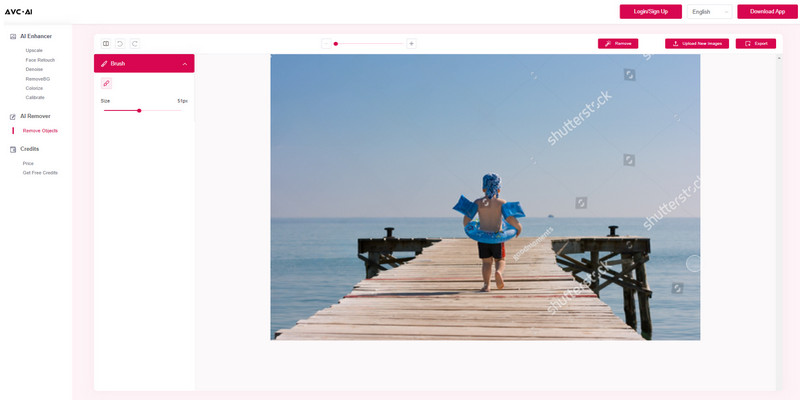
AVCLabs Free Watermark Remover is an AI-powered image watermark removal tool designed to help users remove all types of watermarks quickly and effortlessly. Whether it's text, logos, timestamps, or even large overlay watermarks, it uses advanced AI object removal and intelligent background reconstruction to deliver clean and natural watermark removal results.
AVCLabs also offers a flexible brush tool that allows users to precisely select the watermark area, making it ideal for those who need finer control. At the same time, this AI best watermark remover is beginner friendly - users simply upload an image, select the watermark, and remove it in just a few clicks, with no manual photo editing skills required.
- Effective AI-based image watermark removal tool with free credits.
- Handles multiple watermark types including semi-transparent text overlays, logo watermarks, and tiled full-screen patterns .
- Includes basic video watermark removal.
- Manually removing a full-screen watermark can be time-consuming.
✨ Use AVCLabs Video Watermark Remover to easily delete watermarks, logos, stamps, texts and other unwanted elements on videos with AI.
📝 Our Real-Image Test Verdict:
Among our three test images, AVCLabs Free Watermark Remover performed the cleanest on the solid-colored logos, with smooth edge transitions and no obvious color blocks. However, in the semi-transparent diagonal watermark sample from Shutterstock, there was a slight smudging of the brick wall texture. For lightweight restoration, it performed stably, but there were still visible blurry traces in high-frequency texture scenarios.
2. WatermarkRemover.io
Website: https://www.watermarkremover.io/
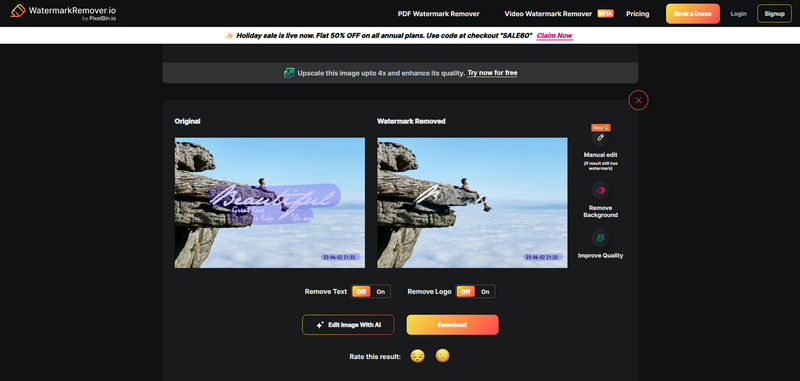
WatermarkRemover.io is one of the best watermark removers free no sign up, specializing in the automatic image watermark removal. Users may remove up to three watermarks daily without needing to create an account and free download image without watermark. This watermark remover free also offers manual editing options, enabling users to further refine any residual watermark after automatic removal.
In tests, it performed well with simple watermarks (such as a single logo or clear text), providing watermark-free output. However, for stacked watermarks, traces of the watermark will still remain on the image.
- Online watermark eraser for automated processing and removing.
- Remove watermarks without logging in and save watermark-free images.
- Background details remain largely intact after removal.
- For more complex watermarks, manual erasing are required.
- The free watermark photo remover is restricted to three images per day.
📝 Our Real-Image Test Verdict:
This tool performs exceptionally well in handling simple logos and text watermarks, especially on clean backgrounds. However, it performs poorly when dealing with tiled or full-image watermarks, often leaving obvious ghosting and blurry reconstruction marks in the textured areas. It is most suitable for basic e-commerce product images.
3. Adobe Firefly
Website: https://firefly.adobe.com/
Adobe Firefly is an AI-driven generative fill tool launched by Adobe, which has been integrated into Photoshop and Adobe's web ecosystem. The core advantage of Adobe Firefly comes from its Diffusion-based Generative Fill Pipeline, which is one of the most advanced generative technologies in the field of image restoration at present. Compared with lightweight online tools, Firefly focuses on context-aware reconstruction and high-fidelity texture synthesis. Its advantages are particularly evident when dealing with backgrounds with structured features such as buildings, fabrics, and natural landscapes.
- Excels at reconstructing missing textural details using context-aware diffusion technology.
- Maintains excellent structural consistency when handling complex scenes.
- Seamless integration with Photoshop, fitting perfectly into professional post-processing workflows.
- Paid subscription required to unlock watermark removal.
- Processing speed is slower than one-click watermark remover.
📝 Our Real-Image Test Verdict:
In all three test scenarios, Adobe Firefly demonstrated the most stable performance, especially in terms of semantic understanding and texture reconstruction. It is one of the most reliable generative filling tools and the best watermark remover for removing watermarks. However, in scenarios with extremely dense or repetitive textures, it may still produce minor smoothing artifacts. To achieve production-level output quality, manual fine-tuning is often required.

4. EzRemove.ai
Website: https://ezremove.ai/watermark-remover/
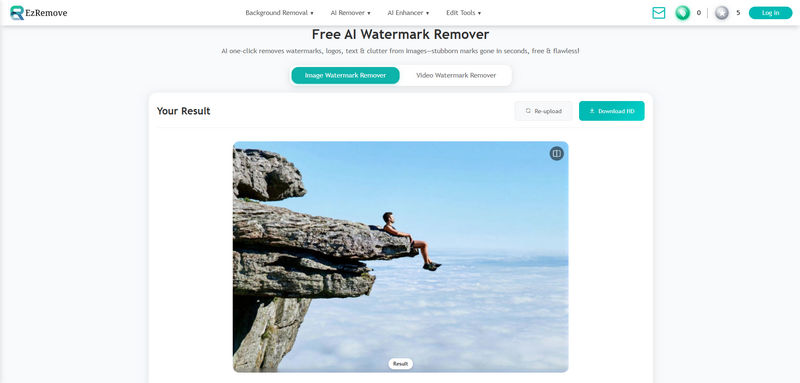
EzRemove.ai stands out as the best watermark remover with unique dual-mode watermark removal, providing users with a complete solution from fully automatic to manual removal: Auto Mode and Manual Erase. This design makes it suitable for both users who prefer quick, automatic results and those who want more hands-on control.
During test, EzRemove.ai removes watermarks effectively, with particularly strong results in Auto Mode. However, the export resolution is limited to HD, which may not be sufficient for users who require higher resolution output.
- Provide 6 free credits to remove watermarks online without login.
- Get 10 extra free credits every day when you sign in.
- Strong automatic watermark removal performance.
- Exported images are restricted to HD resolution.
📝 Our Real-Image Test Verdict:
EzRemove.ai performs well when dealing with simple solid-color backgrounds. It can simply erase the text with a single click. However, for complex patterns or fine details (such as fabric fibers), it often blurs the underlying texture, which means that for professional use, manual refinement is required.
5. AI Ease
Website: https://www.aiease.ai/remove-image-watermark/
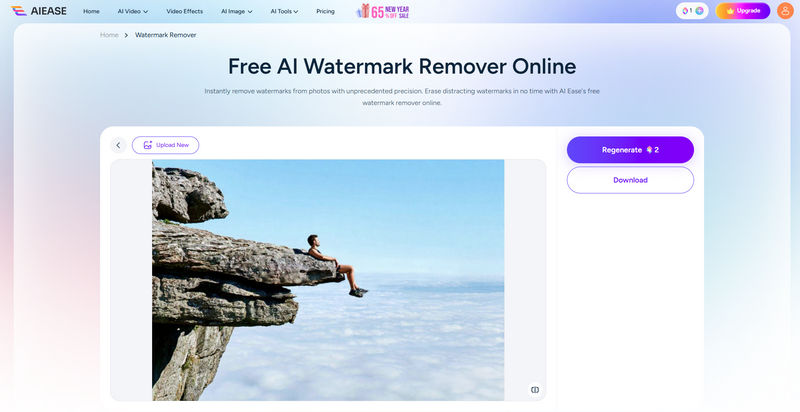
One of its standout features of AI Ease Image Watermark Remover is batch watermark removal, which supports processing up to 50 images at once. This feature is available with a Pro subscription, making it more suitable for users who need to handle large volumes of images efficiently. This best watermark remover allows unregistered users to try it out for free once and experience its removal function.
In tests, AI Ease performed better when processing single watermark, achieving cleaner watermark removal. When using batch processing, some images retained traces of the original watermark.
- No registration is required to remove watermark from photo for free.
- Produces cleaner results and offers better background preservation.
- Supports batch processing, up to 50 images can be processed at once.
- Free users cannot export high-definition images.
- The quality of watermark removal is not consistently high.
📝 Our Real-Image Test Verdict:
AI Ease is capable of quickly and automatically detecting and removing simple watermarks, and the resulting watermark removal effect is satisfactory. However, when dealing with more complex images, especially when removing watermarks that are part of a composite image, it often over-smooths the background and reduces the image clarity. It is suitable for ordinary users but not for those requiring precise operations.
6. Dewatermark.ai
Website: https://dewatermark.ai/
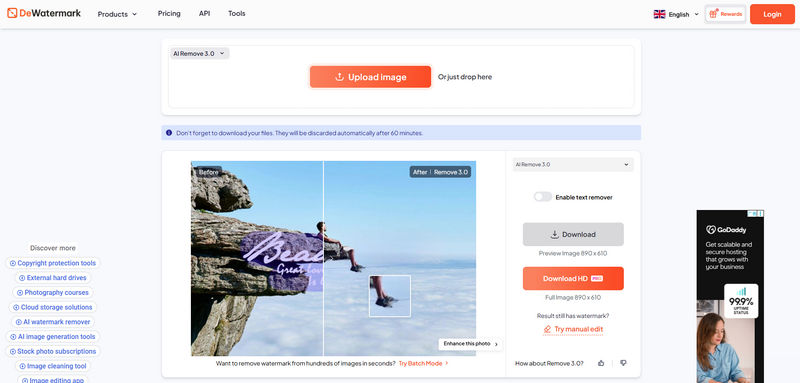
Dewatermark.ai is a free AI watermark removal tool with multiple automatic modes, allowing you to remove watermarks from up to 3 images for free without registration. In addition, users can earn extra free points through registration and daily check-ins for watermark removal. This best watermark remover is well suited for users who need to remove watermarks from a limited number of images each day.
In terms of performance, DeWatermark.ai struggles with multi-layered or overlapping watermarks. Furthermore, there is no significant difference in performance between the three automatic removal modes.
- Sufficient credits are provided for users to remove watermarks for free.
- Automatic and manual erasing options are available for watermark removal.
- Clean removal on simple watermarks and semi-transparent watermarks.
- Advertisements on the interface.
- Batch processing and high-resolution exports are restricted to paid plans.
📝 Our Real-Image Test Verdict:
This tool can effectively handle semi-transparent watermarks while preserving most of the background structure. However, when dealing with complex textures such as brick walls or vegetation, there will be noticeable slight ghosting effects. The overall performance is stable, but it is not the top-notch solution when it comes to handling complex scenes.
7. AVCLabs PhotoPro AI
Website: https://www.avclabs.com/photopro-ai.html
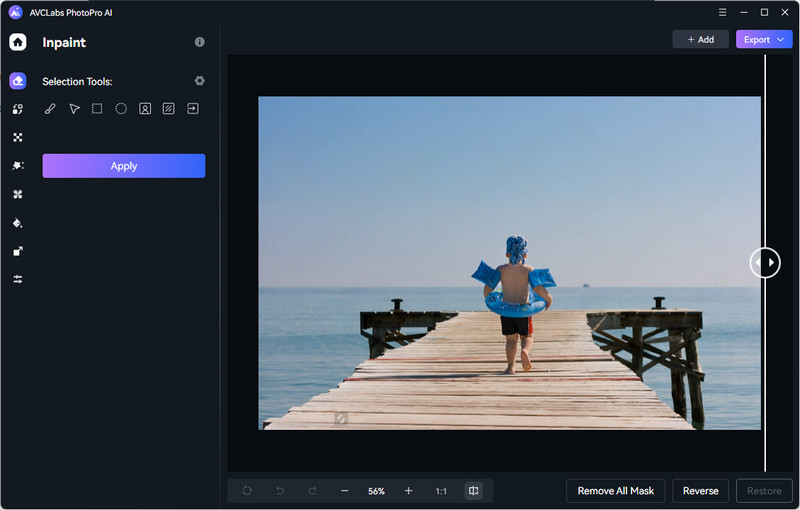
AVCLabs PhotoPro AI is a professional desktop AI photo editor that also serves as a powerful supplement to the online AVCLabs Free Watermark Remover. You can use object recognition, foreground selection, and background selection to select the watermark area with much greater precision. It employs advanced AI image inpainting and generative fill technologies to reconstruct the background after removing the watermark. The AI will analyze the surrounding textures, colors, and patterns to generate visually natural repair content.
In addition to watermark removal, AVCLabs PhotoPro AI integrates a suite of other useful features such as AI upscaling, colorization, background removal, and old photo restoration, which makes it a versatile tool for anyone who works extensively with images. More importantly, local processing keeps all data on your device, guaranteeing no info collection or upload privacy risks.
- One of the best watermark remover with different selection tools.
- Combines functions such as color correction, noise reduction, and image quality enhancement.
- Local image processing protects privacy and security.
- Supports hardware acceleration for faster speeds.
- The images for the free trial are watermarked.
📝 Our Real-Image Test Verdict:
The processing effect of AVCLabs PhotoPro AI is the most balanced, featuring excellent texture reconstruction capabilities and edge-aware restoration technology. Even when dealing with full-screen watermarks in complex landscape photos, it performs exceptionally well; however, due to the more detailed processing process, it takes slightly longer. This tool is most suitable for users who seek high-quality restoration results.
8. HitPaw Watermark Remover
Website: https://online.hitpaw.com/photo-watermark-remover.html
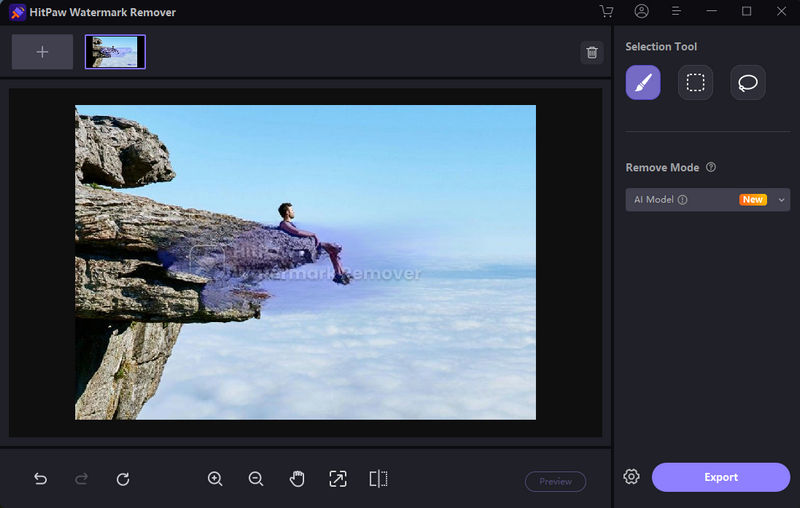
HitPaw Watermark Remover offers a comprehensive solution for removing watermarks from images and videos and is available on multiple platforms, including web-based online watermark removers and desktop software. Note that the online photo watermark remover does not offer a free export option. You can preview the watermark removal results, but downloading the final image requires a paid subscription.
For users who need more advanced removal options, including access to additional AI models and more precise selection tools, using the desktop version HitPaw Watermark Remover is recommended, which provides greater flexibility and control compared to the online tool.
After hands-on testing, because HitPaw primarily relies on manual removal, it performs better when dealing with simple watermarks, such as small logos placed on clean backgrounds.
- The best watermark remover available on web, Windows and Mac.
- Supports both image and video watermark removal.
- The desktop version offers more removal models and refinement tools.
- The online version does not offer a free trial and must pay to export images.
- Does not provide fully automatic watermark recognition and removal.
📝 Our Real-Image Test Verdict:
HitPaw performed well in the removal of logos on solid-color backgrounds, but it tended to show obvious blurring blocks in the semi-transparent watermark test, especially on brick wall textures, where the generated area lacked details. In the full-screen watermark test, it could remove the watermark, but the background texture was overly smoothed out and the AI traces were more prominent.
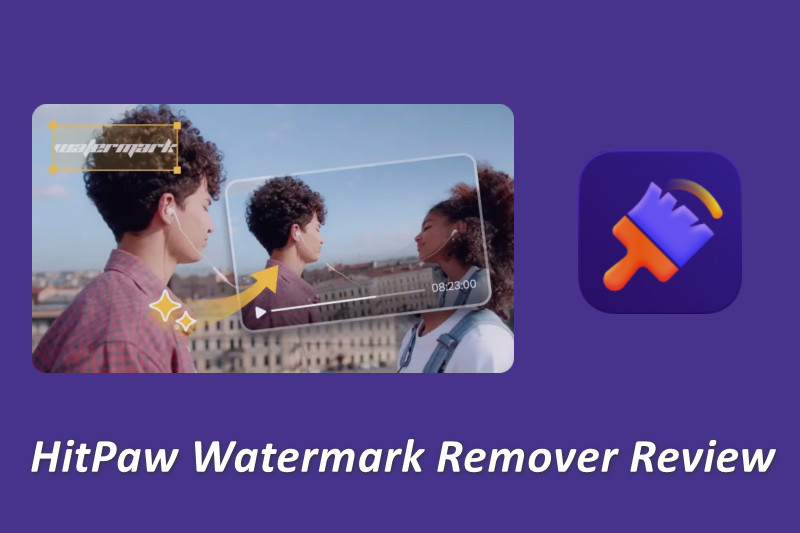
Discover an in-depth review of HitPaw Watermark Remover, its features, pros and cons, and the best alternative to easily remove watermarks without losing quality. Learn more>>
9. Pixelbin
Website: https://www.pixelbin.io/ai-tools/watermark-remover
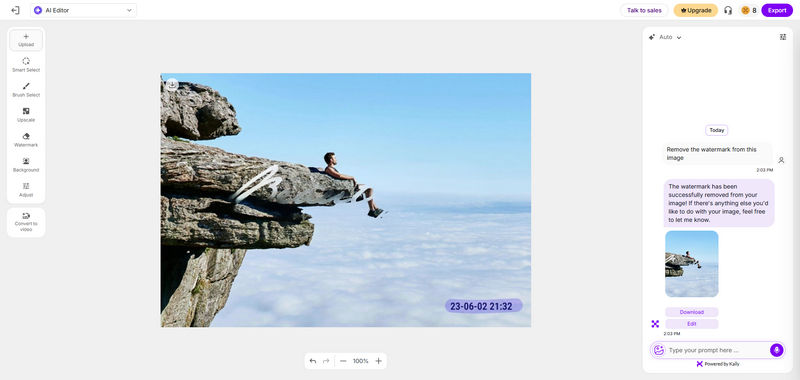
What sets PixelBin.io apart as a top AI watermark remover is its incredible flexibility to handle watermarks in different methods within a single interface. You can choose a prompt-based generative AI approach or manual control using smart selection and brush selection tools. Furthermore, PixelBin includes a dedicated watermark removal mode that allows users to remove text and logo watermarks based on image content.
Based on testing, PixelBin's image upload speed is slower than most other online watermark removers. Full-screen watermarks can be effectively removed using either automatic or AI generative methods, resulting in clean images with no background loss. However, stacked or overlapping watermarks disappoint across methods, leaving traces or artifacts.
- Best watermark remover with batch processing of up to 50 photos.
- Offers the most comprehensive set of watermark removal tools (Automatic, Manual, and Generative).
- Effective for full-image or tiled watermarks.
- Slow image upload speed.
- Inconsistent removal result on complex waterm overlays.
📝 Our Real-Image Test Verdict:
Pixelbin performs exceptionally well when removing semi-transparent watermark layers, without affecting the clarity of the image. However, when dealing with pure color logos with extremely irregular shapes, its automatic mode performs poorly and often requires manual intervention to remove the remaining edge artifacts.
10. PicWish
Website: https://picwish.com/remove-image-watermark
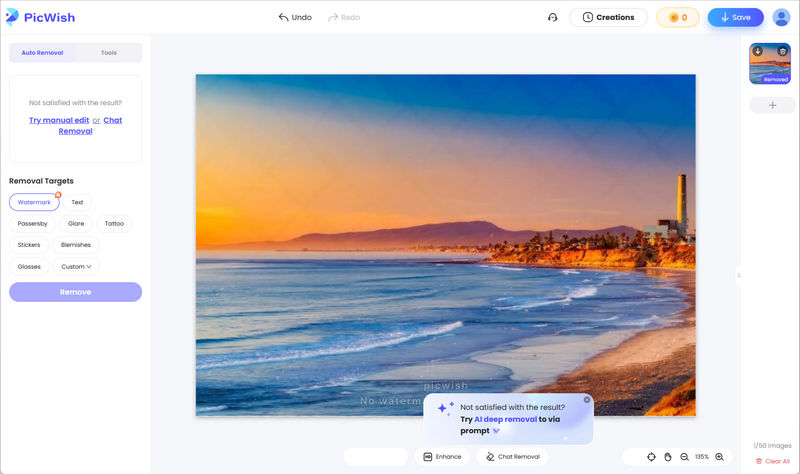
PicWish is a well-known online AI watermark image remover tool that offers 3 watermark removal modes: auto removal, manual editor, and chat removal. The manual editing tool is the most feature-rich, providing features such as generative fill, manual refine , text detection, and object detection, allowing users to fine-tune the removal area and improve accuracy when processing small or well-defined watermarks.
It appears that PicWish is suitable for handling small watermarks, achieving a clean and flawless removal effect. However, it performs poorly with full-screen, often leaving visible traces after removal. Furthermore, the Chat Removal mode repeatedly displayed "Failed to handle", and the watermark could not be removed according to the text instructions.
- Works well as a best watermark remover when dealing with small-area watermarks.
- Convenient selection tools make selecting watermarks fast and intuitive.
- Provides a more natural reconstruction with Generative Fill option.
- Unstable performance and removal quality is inconsistent.
- Limited removal result for complex watermarking scenarios.
📝 Our Real-Image Test Verdict:
For simple watermark overlay, PicWish has a fast processing speed and produces clean results. However, when dealing with complex backgrounds, the outcome often shows blurred edges and slight ghosting. It is suitable for lightweight tasks but not for challenging image restoration scenarios.
FAQ About Best Watermark Remover
Will removing a watermark reduce the original image quality?
Most AI watermark remover can remove the watermark while retaining most of the original image quality. However, the final result depends on factors such as the size and position of the watermark, as well as the complexity of the image background.
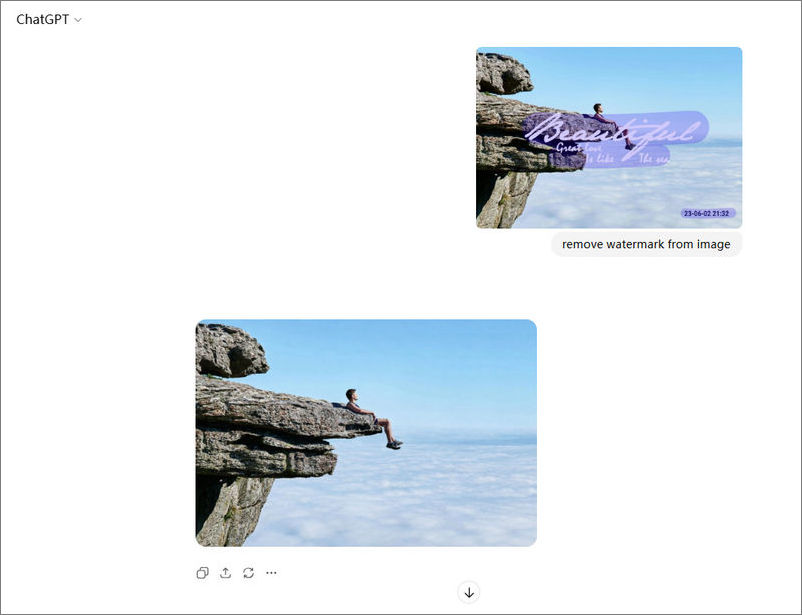
Can ChatGPT take watermarks off photo?
While we've tested ChatGPT and found it can indeed remove watermarks from images with decent results, it's important to note that ChatGPT is not a dedicated watermark remover tool. Sometimes it may not work as instructed, as it considers watermarks to protect ownership and copyright. Therefore, before removing watermarks from any images, please ensure you have the legal rights.
What is the best alternative if the AI leaves a blurry smudge?
If your AI watermark remover leaves blurry smudges or unnatural patches, then consider using a tool that employs advanced AI inpainting and generative fill technology. For instance, solutions such as AVCLabs Online Watermark Remover, AVCLabs PhotoPro AI, and Adobe Firefly can reconstruct textures and backgrounds and enhance the overall image quality when removing watermark.
Can AI watermark removers handle complex, full-screen tiled watermarks?
Yes. You can use tools that employ Generative Fill and advanced AI image restoration techniques, such as AVCLabs PhotoPro AI and Adobe Firefly. These watermark removal tools are capable of handling full-screen tiled watermarks by reconstructing large areas of the image, without leaving obvious traces or blurry smudges.
Conclusion
After testing and comparing the top 10 best watermark removers in 2026, it was found that each tool has its own advantages. Most online watermark removal tools offer free trials and credits for users to test their functionality. If you don't want to upload images to the cloud for processing, you can choose a local processing tool like AVCLabs PhotoPro AI, which also offers more accurate watermark removal.